

Samsung TV Plus
Samsung TV Plus is Samsung’s free streaming service that brings live TV channels and on‑demand shows to supported Galaxy phones, tablets, and smart TVs. You can jump straight into news, sports, movies, and kids content without signing up or paying a subscription fee.
It is an Android entertainment app like Zuflix and Baby Go, which is developed by Samsung Electronics Corporation. It offers a collection of TV channels, which users can stream for free. The users are free to watch their favorite television shows, dramas, movies, and many more.
With the Samsung TV Plus APK available on our website, Android users with compatible Samsung devices can access the same channel lineup they enjoy on Samsung smart TVs right on mobile. Just install the app, open it, and start watching live TV instantly.
The app focuses on simple navigation and fast channel switching, making it easy to browse categories, discover trending channels, and keep the whole family entertained in one place.
Rate this app
App details
- App name
- Samsung TV Plus
- Category
- Entertainment
- Version
- v1.0.28.6
- Size
- 17.01 MB
- Requirements
- 9.0 and Above
- Package name
- com.samsung.android.tvplus
- Publisher
- Samsung Electronics Co. Ltd.
- Price
- Free
- Mod
- No
- Downloads
- 77,324
- Rating
- 4.7 / 5
- Rating count
- 30,027
- Play Store
- Yes
- Requires root
- No
- Offline support
- No
- Contains ads
- Yes
- In-app purchases
- No
- Updated
- May 30, 2026
- Age rating
- Rated for 7+
Table of contents
What is Samsung TV Plus?
Samsung TV Plus is a free streaming app developed by Samsung Electronics Co., Ltd. that delivers live TV channels and selected on‑demand content to Samsung devices. It comes preinstalled on many Samsung Smart TVs and Galaxy devices, and can also be installed via APK on supported Android phones and tablets.
The app focuses on linear, channel-based viewing. Instead of browsing individual episodes first, you choose from a grid of TV channels, similar to traditional cable or satellite. Categories typically include news, entertainment, movies, sports, lifestyle, music, and kids programming.
Samsung TV Plus does not require credit card details or a paid membership to start watching. Once you install the APK and open the app on a compatible Samsung device, you can access the available channels for your region right away.
Availability, channel lineup, and features can vary by country and device model, but in general the service is designed to give Samsung users an easy way to watch live TV without extra hardware or monthly fees.
Why download Samsung TV Plus APK from our site?
Installing the Samsung TV Plus APK on your Android device lets you enjoy the same free TV experience you see on Samsung Smart TVs, now in a mobile format. You can stream news updates, catch a movie on the go, or keep children busy with cartoon channels without signing into multiple apps.
The official installation file is available directly on our website, so you can download the APK, transfer it to your compatible Samsung phone or tablet if needed, and install it manually. This is especially helpful if you do not see Samsung TV Plus listed in your local Play Store or Galaxy Store.
Because the service does not require registration, you can move from download to watching live channels in just a few steps. Whether you want an extra TV screen around the house or a simple way to follow live news while commuting, the APK provides a quick setup path.
How is Samsung TV Plus useful?
Samsung TV Plus is useful for anyone who wants a straightforward, channel-based streaming experience without managing multiple logins or subscriptions. It turns compatible Galaxy devices into portable TVs that mirror the feel of a traditional channel lineup.
Families can use the app to access kids channels and animated content, while adults keep up with global and local news, lifestyle shows, and movies. Because the content streams live, you can tune in for breaking news coverage or live sports channels where available in your region.
The app’s categorization and EPG-style guide make it easy to browse what is currently airing and quickly switch between channels. For Samsung users, it also complements the TV experience, allowing you to continue watching on mobile when you move away from the living room.
How to download and install Samsung TV Plus APK
You can download the official Samsung TV Plus APK file directly from our website and install it on a compatible Samsung Android device. Follow these steps to complete the process:
Scroll to the download section on this page and tap the download button for the Samsung TV Plus APK.
Wait for the APK file to finish downloading to your phone, tablet, or computer.
If you downloaded it on a computer, transfer the APK to your Samsung Android device using a USB cable, Bluetooth, or cloud storage.
On your Android device, open Settings and enable app installs from unknown sources or your browser/file manager, depending on your Android version.
Locate the downloaded APK in your file manager and tap it to start the installation process.
Confirm the prompts on screen and wait until the installation completes.
Open Samsung TV Plus from your app drawer and start browsing live TV channels.
After installation, make sure your device is connected to the internet and signed into a Samsung-compatible environment so the app can load the correct channel lineup for your region.
Features
Free live TV streaming
Watch a selection of live TV channels at no subscription cost on compatible Samsung devices.
Channel-based interface
Browse an electronic program guide style grid and switch between channels like traditional television.
Wide range of genres
Access news, entertainment, movies, sports, lifestyle, music, and kids channels depending on your region.
On-demand movies and shows
Enjoy a library of on-demand movies and programs in addition to live channels where available.
No account or credit card required
Start watching without creating an account or entering payment information.
Optimized for Samsung Galaxy and Smart TVs
Designed primarily for recent Samsung Galaxy phones, tablets, and Samsung Smart TVs.
Kids-friendly channels
Includes dedicated kids and cartoon channels with child-focused content.
News coverage from multiple networks
Follow global and local news through a variety of news channels and 24/7 feeds.
Screenshots
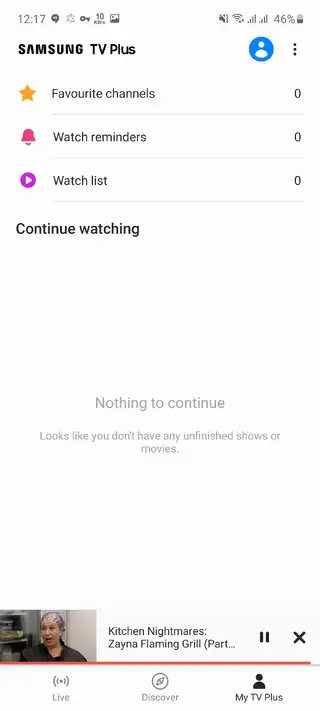
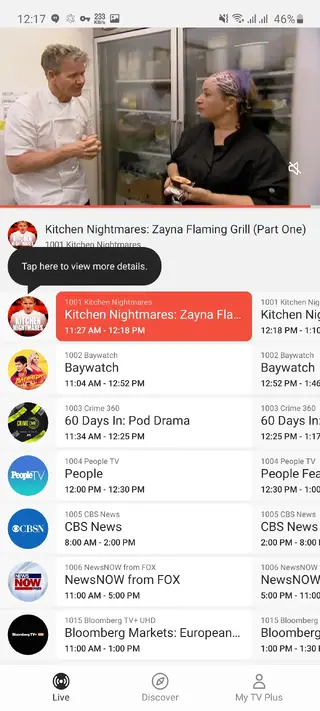
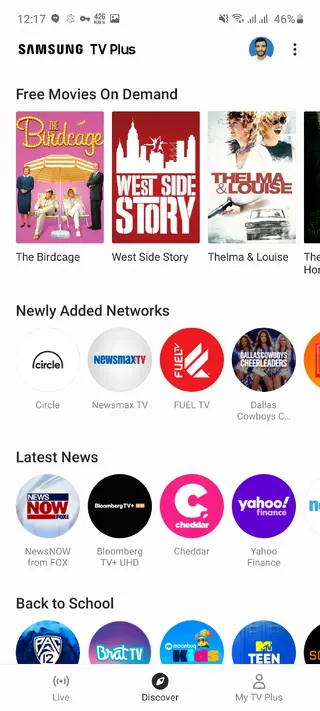
Device compatibility and requirements
Samsung TV Plus is designed mainly for Samsung Smart TVs and many newer Samsung Galaxy phones and tablets. The APK information provided on this page is for the Android version with a stated requirement of Android 9.0 and above. In practice, compatibility can still vary by model, region, and software build.
If the app does not appear in your app drawer after installation, or if it shows a message that the device is not supported, your particular device or region may not be eligible for the service. Keeping your Samsung firmware and One UI updated increases the chances of full support.
Content availability and regions
The exact channels and on-demand titles you see in Samsung TV Plus depend heavily on your country or region. Samsung partners with local and international networks to deliver curated channel lineups for each supported market.
Some users may see many news and lifestyle channels, while others get a stronger focus on movies, sports, or kids content. Licensing rules can also change over time, so the selection you see today may evolve with new agreements and content additions.
Tips for a better streaming experience
For the smoothest Samsung TV Plus experience, a stable internet connection is important. Streaming live TV can use more data than simple web browsing, so Wi‑Fi is usually preferable to mobile data when available.
Use a reliable Wi‑Fi connection for full HD channels where supported.
Close unnecessary background apps to free up memory on low-end devices.
Keep your Samsung TV Plus app and device software updated to the latest version.
If you encounter buffering, try moving closer to your router or switching networks.
Following these steps can help minimize interruptions and provide a more consistent viewing experience on your Samsung Android device.
FAQs
Pros
- Free live TV channels without subscription fees
- No sign-up or credit card required to start watching
- Simple, channel-based interface that is easy to navigate
- Good range of genres including news, movies, sports, and kids content
- Works seamlessly on many recent Samsung Galaxy phones, tablets, and smart TVs
- Supports both live streams and on-demand content where available
Cons
- Works primarily on Samsung devices and may be unavailable on other brands
- Channel lineup and availability vary significantly by country
- Requires a stable internet connection for smooth streaming
- Contains advertising during or between programs
- Not all regions have the same number of sports or premium movie channels
Conclusion
Samsung TV Plus delivers a familiar, channel-based TV experience on compatible Samsung Android devices at no subscription cost. By downloading the official APK from our website, you can quickly install the app, open it, and start watching live news, entertainment, and kids channels in just a few steps, as long as your device and region are supported.




Comments
No approved comments yet.