

Tesla
Tesla APK is the official mobile companion app for Tesla owners. It lets you connect your Android phone or tablet to your Tesla vehicle and manage key functions from anywhere with network access.
With this app you can check charging status, precondition the cabin, lock or unlock doors, and view live location details. You can download the Tesla APK directly from our website and start controlling your car remotely in a few simple steps.
The app is designed for everyday use, whether you are monitoring your battery before a trip, locating your parked car, or using supported remote driving and access features on compatible models.
As you know Tesla is one of the most popular electric vehicle companies, which provides the most latest technology-based vehicles. One of the best things about the company is the use of clean energy, which doesn’t affect the environment at any level. Apart from this, Muliatrack and FleetFinder App also provide active services for Vehicles
Rate this app
App details
- App name
- Tesla
- Category
- Lifestyle
- Version
- v4.56.5-4281
- Size
- 9.94 MB
- Requirements
- 7.0 and Above
- Package name
- com.teslamotors.tesla
- Publisher
- Tesla, Inc.
- Price
- Free
- Mod
- No
- Downloads
- 126,454
- Rating
- 5.0 / 5
- Rating count
- 5
- Play Store
- Yes
- Requires root
- No
- Offline support
- No
- Contains ads
- No
- In-app purchases
- No
- Updated
- May 8, 2026
- Age rating
- Rated for 3+
Table of contents
What is the Tesla Android app
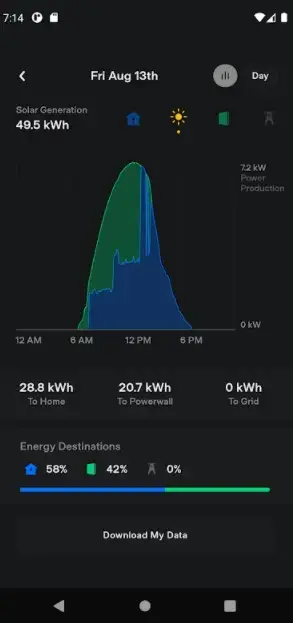
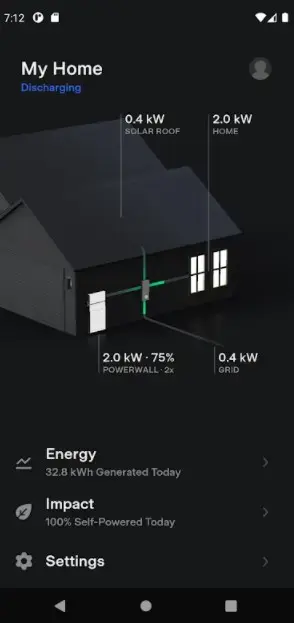
The Tesla Android app is an official Lifestyle and vehicle companion application from Tesla, Inc. It connects your Android device to your Tesla vehicle and energy products through your Tesla account. Once you sign in, the app links to your car and lets you see real-time status, send commands, and manage many day-to-day tasks without sitting inside the vehicle.
Through a clean and simple interface, you can view battery and charging information, control locks, lights, climate, and more. On supported models and configurations, the app also exposes advanced features such as Summon and Smart Summon, allowing limited remote maneuvering of the vehicle in suitable environments.
The app works alongside the in-car touchscreen and your Tesla account dashboard, giving you a convenient remote control hub on your phone. Our website provides the Tesla APK file so you can install the app manually on compatible Android phones and tablets.
Why download the Tesla APK from our site
Installing the Tesla APK on your Android device turns your phone into a powerful remote companion for your vehicle. You can quickly check charging progress, warm or cool the cabin before driving, and secure the car without using the key fob or card.
By downloading the Tesla APK directly from our website, you get an installable file that you can keep, back up, or sideload on compatible Android devices whenever needed. This is especially useful if the Play Store is unavailable on your device or if you prefer managing your app files manually.
The app centralizes everyday actions in one place, so you spend less time in menus and more time driving. From navigation sharing to live car location, having the APK installed ensures you can access core Tesla features whenever your phone has an internet connection.
How the Tesla app is useful for owners
The Tesla app adds practical value to daily ownership. You can check your battery level before leaving home, adjust the climate so the cabin is comfortable on arrival, or unlock the car for a family member without handing over a physical key. These simple actions save time and create a smoother driving routine.
For long-distance driving, the app helps you monitor charging sessions at home or at public stations. You can start or stop charging from your phone, keep an eye on estimated range, and make quick decisions about when to depart.
Security and peace of mind are another benefit. The app lets you see where the car is located, confirm it is locked, and, when supported in your region, access features like Sentry Mode notifications. All of this makes the Tesla Android app a central tool for managing both convenience and security aspects of your vehicle.
How to download and install Tesla APK
You can get the official Tesla APK directly from our website and install it on any compatible Android phone or tablet. Follow these steps to complete the download and installation process.
Scroll to the download area on this page and tap the Tesla APK download button.
Wait for the APK file to finish downloading to your Android device.
Open your device settings and, if required, allow installation from your browser or file manager.
Locate the downloaded Tesla APK in your Downloads folder and tap it to start installation.
Follow the on-screen prompts to install the app, then open it from your app drawer.
Sign in with your Tesla account credentials and link your vehicle to start using remote features.
After installation, you can keep the APK file from our website as a backup or reinstall it later on other compatible Android devices you own.
Features
Remote climate control
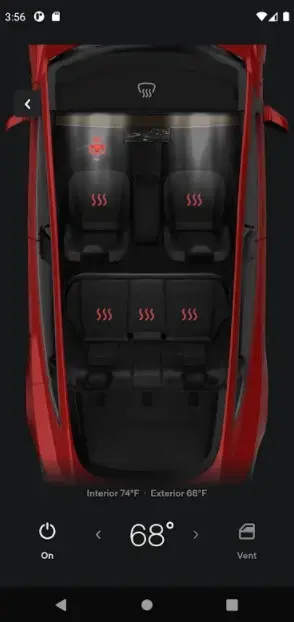
Preheat or cool the cabin, set temperature and control seat or steering wheel heating on supported models before you enter the vehicle.
Charging status and control
View battery level, charging speed and estimated remaining time, and start or stop charging sessions remotely from your phone.
Lock and unlock doors
Secure your car by locking or unlocking doors remotely and checking lock status without using a key fob or key card.
Vehicle location tracking
See your car on a map with live location updates so you can quickly find it in large parking areas or verify its position.
Controls for lights and horn
Flash the lights or sound the horn to locate your car or alert others when you are approaching the vehicle.
Open trunk and frunk
Remotely open or close the rear trunk and, on supported models, the front trunk to load or unload items easily.
Autopilot and Summon access
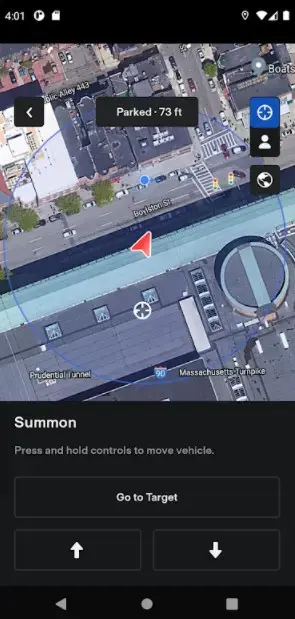
On compatible vehicles, access Summon and related features that can move the car in and out of tight parking spaces.
Panoramic roof control
For models equipped with a panoramic roof, adjust the roof opening from your phone for extra ventilation or light.
Screenshots
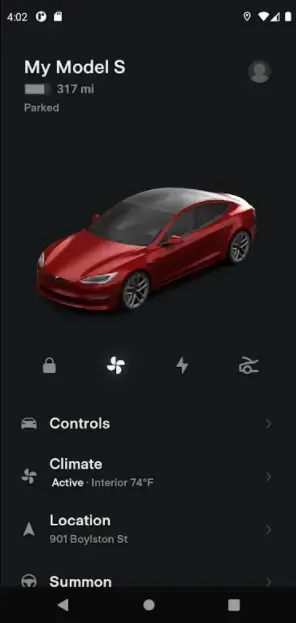
Tesla app compatibility and requirements
The Tesla app is designed for Android devices running Android 6.0 or higher. To use it, you need a valid Tesla account and at least one compatible vehicle or energy product associated with that account. Some features, such as Summon or Smart Summon, require specific hardware packages and may only be available in certain regions.
Before installing the APK from our website, ensure your device has enough storage and that you know your Tesla account login details. Once installed, keep the app updated regularly so you can access new features and improvements as Tesla releases them.
Security and privacy considerations
The Tesla app controls sensitive vehicle functions such as locks, climate and driving-related features on supported models. Protecting access to your Tesla account is therefore essential. Use a strong, unique password and enable additional security options such as multi-factor authentication if available in your Tesla account settings.
Always sign in only on devices you trust and keep your phone locked with a secure screen lock. If you lose your device, change your Tesla account password promptly and review active sessions from your Tesla account to maintain control over your vehicle access.
Tips for everyday use
To get the most out of the Tesla Android app, integrate it into your daily driving routine. Before you leave home or work, open the app and precondition the cabin so it is comfortable when you enter. During charging sessions, keep an eye on progress and set your preferred charge limit directly from your phone.
When parking in busy areas, use the lights and horn controls to find your vehicle quickly. For trips, share your destination from mapping apps on your phone straight to the in-car navigation, so your route is ready by the time you get in. These small habits can make owning and driving a Tesla more convenient and efficient.
FAQs
Pros
- Official companion app from Tesla, Inc.
- Remote access to charging, climate, locks and more
- Simple interface that is easy to understand
- Live location tracking and vehicle status view
- No advertising within the app
- Works across multiple Tesla vehicles on one account
Cons
- Requires an active Tesla account and compatible vehicle
- Needs continuous internet connectivity for most functions
- Advanced features depend on specific car model and region
- Does not work as a standalone app without Tesla hardware
Conclusion
Tesla APK gives Tesla owners a practical way to manage their vehicles from an Android phone or tablet. With remote climate, charging, security and location tools in one place, it streamlines everyday use of the car. Download the APK from our website, sign in with your Tesla account, and start controlling key functions of your vehicle wherever you are.




Comments
No approved comments yet.