

Tribün TV
Tribün TV is a Turkish IPTV and VOD app that lets you watch live TV channels, movies, and series directly on your Android phone or tablet. It focuses on providing fast and simple access to entertainment in one place.
The app groups channels and videos into clear categories like news, sports, entertainment, cartoons, and more. You can open the stream with the built-in player and start watching within seconds.
You can download the official Tribün TV APK file directly from our website and install it on compatible Android devices without any registration or subscription inside the app.
Rate this app
App details
- App name
- Tribün TV
- Category
- Entertainment
- Version
- v9.9
- Size
- 11.5 MB
- Requirements
- 5.0 and Above
- Package name
- com.hs.tribuntv1
- Publisher
- TRIBUNTV
- Price
- Free
- Mod
- No
- Downloads
- 84,694
- Rating
- 4.7 / 5
- Rating count
- 22,749
- Play Store
- No
- Requires root
- No
- Offline support
- No
- Contains ads
- No
- In-app purchases
- No
- Updated
- May 13, 2026
- Age rating
- Rated for 3+
Table of contents
What is Tribün TV APK
Tribün TV APK is an Android entertainment application designed mainly for Turkish-speaking users who want quick access to live TV and on-demand content. It combines IPTV channels, movies, and web series in a single, simple interface.
The app focuses on Turkish language content and menus, so native speakers can navigate easily. Once installed, you can browse categories, open a channel or video, and start streaming through the built-in media player.
Unlike many premium TV and movie platforms, Tribün TV works without any login or in-app subscription. After you install the APK on your device, you can launch the app and begin exploring its channels and video library immediately.
We have more similar app Apk files provided on this website, which you can also play and have fun with. So, if you are willing to have unlimited fun, then you can try Netv Gold and Inat Box. Both of these are quite popular apps that you can also use.
Why download Tribün TV for Android
People download Tribün TV because it offers a straightforward way to watch TV and video content on Android without complicated sign-up steps. The main screen lists IPTV categories such as news, sports, entertainment, music, documentaries, and cartoons, so you can jump to what you like quickly.
Tribün TV also includes a section for movies and web series, including titles inspired by content from popular premium platforms. This helps users keep up with newer films and shows within a single app.
Another reason to download it is the built-in video player. You do not need to install a separate player app, since Tribün TV can handle both live TV streams and on-demand media from inside the same interface.
How Tribün TV is useful
Tribün TV can be useful for users who want a compact streaming solution tailored to Turkish content. The IPTV section lets you follow live news, sports events, and general entertainment channels from your phone, which is handy when you are away from a TV.
The on-demand library with movies and web series gives you another way to pass time without switching between different apps. You can browse titles, open a stream, enable subtitles when available, and watch in full-screen mode.
Because the app is built with low-end Android devices in mind, it aims to work even on older phones and with slower connections. Fast servers and an optimized player help maintain stable playback, which makes the app more practical for everyday use.
How to download and install Tribün TV APK
You can download the official Tribün TV APK file directly from our website and install it on your Android device in a few simple steps.
Scroll to the download section on this page and tap the APK download button.
Wait for your browser to finish downloading the Tribün TV APK file.
Open your phone settings and enable installation from unknown sources if it is not already allowed.
Locate the downloaded file in your Downloads folder and tap it to start installation.
Follow the on-screen prompts and complete the installation process.
Open the Tribün TV app from your app drawer and start exploring live channels and movies.
After installation, you can return to this page whenever you need to download the latest available version of Tribün TV for Android.
Features
Live IPTV channel categories
Provides IPTV channels grouped into sections like news, sports, entertainment, music, documentaries, and cartoons.
Movies and web series library
Offers a catalog of films and series, including recent titles inspired by popular premium platforms.
Built-in media and IPTV player
Includes an internal player that can handle live TV streams and on-demand videos without extra apps.
Turkish language interface
Features a user interface focused on Turkish, making navigation easier for Turkish-speaking users.
Full-screen HD playback
Supports full-screen viewing with high-quality playback when the stream and connection allow it.
Search function
Lets you quickly search for specific channels or video titles inside the app.
Subtitle support
Provides subtitle options on supported movies and shows for better understanding.
Optimized for slow internet
Aims to work with slower internet connections by using relatively efficient streaming servers.
Screenshots
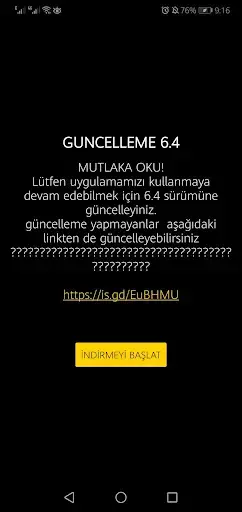
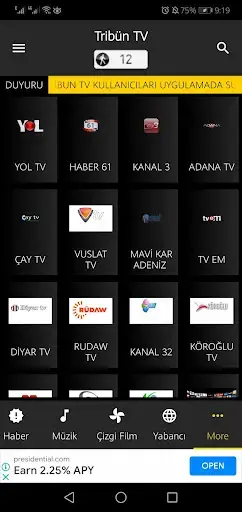
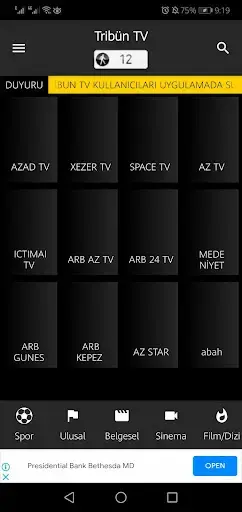
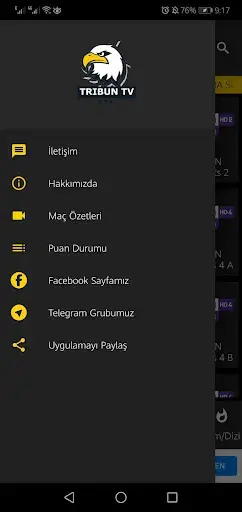
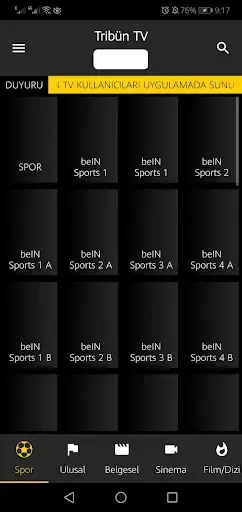
IPTV channels and live streaming experience
The IPTV section is one of the main reasons people use Tribün TV. Channels are grouped into lists such as news, sports, entertainment, music, documentaries, and kids, making it easier to jump straight to the type of content you want.
When you tap on a channel, the built-in player opens and starts the live stream. The app uses fast servers where possible, so channel switching is usually quick and responsive. This design helps you follow live matches, breaking news, or daily shows from a single interface.
Movies and web series in Tribün TV
Tribün TV also offers a collection of movies and web series for on-demand viewing. Titles range from recent popular films to various series episodes, and the catalog is aimed at Turkish-speaking audiences.
You can browse through categories, pick a movie, and watch it directly in the built-in player. For many users, this combination of live TV and VOD in one light app is more convenient than switching between multiple streaming applications.
App compatibility and device requirements
Tribün TV is built for Android phones and tablets running modern versions of the operating system, with support starting from Android 5.0 and above. The app is relatively small in size and is optimized to run on low-end hardware.
Although it can work on older devices, performance still depends on available RAM, processor speed, and your internet connection. Keeping your system updated and closing unused background apps can improve the stability of streams inside Tribün TV.
FAQs
Pros
- Simple IPTV and VOD app focused on Turkish users
- Provides live TV channels across multiple categories
- Includes movies and web series in the same app
- Built-in video player works for both IPTV and media files
- No account registration or login required
- Can work on many low-end Android devices
Cons
- Requires a stable internet connection for streaming
- Not available on the Google Play Store
- Content and interface mainly limited to the Turkish language
- Streaming quality depends on server load and network speed
Conclusion
Tribün TV is a focused IPTV and video-on-demand app for Android users who prefer Turkish content. By combining live channels, movies, and series with a built-in player and simple navigation, it offers a compact way to watch TV-style entertainment on mobile devices. You can download the latest Tribün TV APK directly from our website and keep it updated whenever a new version is released.




Comments
No approved comments yet.