

XCIPTV
XCIPTV is a customizable IPTV player for Android that lets you log in with your own provider credentials and playlists. It focuses on giving you a clean, TV-style interface for live channels, movies, and series.
You can add Xtream Codes, M3U URLs, and other supported panel types to turn your phone, tablet, or Android TV into a simple streaming hub. The app itself does not include channels and works only with content from your IPTV provider.
You can download the official XCIPTV APK 7.0 directly from our website and install it on compatible Android devices running version 5.0 and above.
Rate this app
App details
- App name
- XCIPTV
- Category
- Entertainment
- Version
- v7.0
- Size
- 93.45 MB
- Requirements
- 5.0 and Above
- Package name
- com.nathnetwork.xciptv
- Publisher
- OTTRUN
- Price
- Free
- Mod
- No
- Downloads
- 478,276
- Rating
- 4.4 / 5
- Rating count
- 5,664
- Play Store
- Yes
- Requires root
- No
- Offline support
- No
- Contains ads
- No
- In-app purchases
- No
- Updated
- Jun 2, 2026
- Age rating
- Rated for 16+
Table of contents
What is XCIPTV APK
XCIPTV APK is an Android IPTV and media player developed by OTTRUN. The app provides an interface for watching live TV channels, movies, and TV series that come from your own IPTV provider or playlist. It runs on Android phones, tablets, Android TV boxes, and some smart TVs based on Android.
The application supports multiple panel types such as Xtream Codes API, M3U URLs, and other compatible APIs. Once you sign in with your subscription or add a playlist link, XCIPTV organizes the content into live TV, VOD, and series sections with an EPG-style layout where supported.
XCIPTV does not ship with built-in channels or content. You must already have an IPTV service, URL, or playlist to use with this player. The app focuses on offering a stable player, category-based navigation, and a remote-friendly TV interface.
XCIPTV Android is a simple TV Channel Player, specially developed to play live channels. However, no in-app channels are available in this application. Therefore, users have to add playlists or subscription plans to access live channels manually. This page provides complete information related to the available methods. Get similar services with Iron TV Pro & O2 TV SK.
Why download XCIPTV for Android
Downloading XCIPTV on Android makes it easier to use your IPTV subscription on different screens without relying on a specific operator app. The player is designed to work well with remote controls, offering a layout similar to a smart TV experience.
XCIPTV supports multiple login formats, which helps if your provider gives Xtream Codes details, M3U links, or other panel types. Once configured, you can quickly switch between live TV, catch-up, movies, and series from a single dashboard.
The official XCIPTV APK file is available on our website, so you can install the latest version directly, even on devices where Google Play is not available or where updates are slower.
How XCIPTV is useful
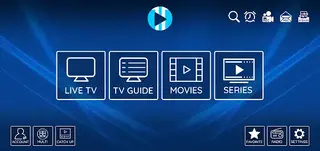
XCIPTV is useful for anyone who wants to centralize IPTV viewing on Android without a complex setup. By entering your provider details once, you get channel lists, categories, and on-demand sections arranged in a clear layout that works with touch and remote navigation.
The app includes a built-in media player with support for different streaming formats, multiple audio tracks, and subtitle options when provided by your source. It also allows quality adjustments so you can match video resolution with your internet speed.
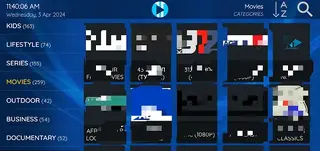
XCIPTV can organize live channels by country, genre, or provider categories, and it can separate VOD and series into dedicated tabs. This structure makes it easier to find content compared to manual file-based players or generic media apps.
How to download and install XCIPTV APK
You can download the XCIPTV APK file directly from our website and then install it manually on your Android device. Make sure your device runs Android 5.0 or higher before you start.
Follow these steps to download and install:
Scroll to the download section on this page.
Tap the download button to get the official XCIPTV APK 7.0 from our website.
Wait for the file to finish downloading on your device.
Open your device settings and enable app installation from unknown sources if it is disabled.
Locate the downloaded APK in your Downloads folder and tap it.
Confirm the installation prompts and wait until the process finishes.
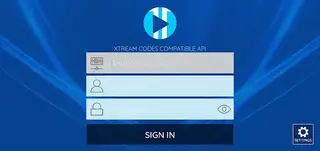
Open XCIPTV, enter your IPTV provider credentials or M3U URL, and start using the app.
Features
IPTV-focused player interface
Designed specifically for IPTV services with sections for live TV, movies, and TV series.
Multiple panel type support
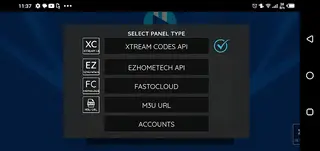
Supports Xtream Codes API, M3U URL playlists, and other compatible IPTV account types.
No built-in channels
Works only with your own IPTV subscriptions or playlists, giving you full control over content sources.
Built-in multimedia player
Includes an internal player capable of handling different streaming formats with playback controls.
Subtitle support
Allows use of subtitles in multiple languages when provided by the IPTV stream or file.
Adjustable video quality
Lets you change video quality to match your internet connection, including HD and Full HD where available.
Category-based navigation
Sorts live channels and VOD into categories to make browsing and discovery easier.
Remote and touch friendly UI
Interface works well on phones, tablets, and Android TV devices with either touch or remote control.
Screenshots

Supported panel types and playlists
XCIPTV supports several common IPTV panel types used by service providers, which makes it flexible for different account setups. The most widely used options are Xtream Codes API and M3U playlists, but the app can also integrate with other compatible APIs where offered.
With M3U playlists, you can paste a URL that contains all your channels, categories, and on-demand content. For Xtream Codes-style logins, you typically enter a server URL, username, and password supplied by your IPTV provider. Once added, XCIPTV syncs the channel list and organizes it into live and VOD sections.
FAQs
Pros
- Specialized IPTV player interface optimized for live TV and VOD
- Supports multiple IPTV login types including Xtream Codes and M3U URLs
- Built-in media player with subtitle and quality options
- Works on phones, tablets, and many Android TV devices
- No registration required inside the app to use your existing IPTV details
Cons
- Provides no built-in channels or content by default
- Requires a stable internet connection for smooth streaming
- Setup depends on your IPTV provider details, which may confuse new users
- Some features can vary depending on the provider’s playlist and panel type
Conclusion
XCIPTV is a practical IPTV player for Android users who already have an IPTV subscription or playlist and want a clean, TV-like interface. By installing the official APK from our website and adding your own provider details, you can organize live channels, movies, and series in one place and enjoy a straightforward streaming experience on supported Android devices.




Comments
No approved comments yet.